Glisse
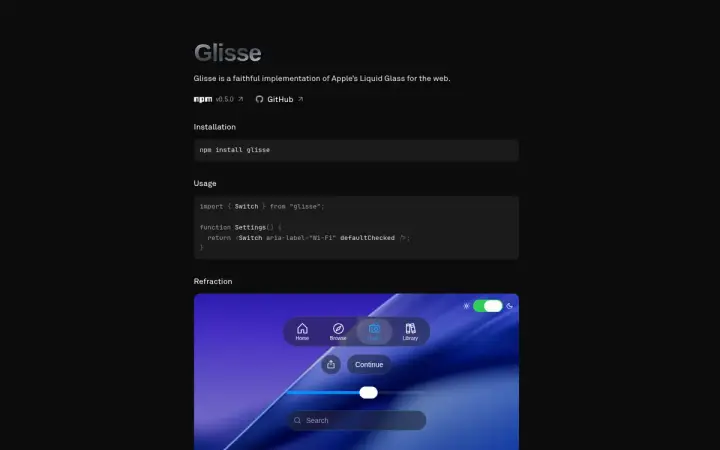
freeA faithful web implementation of Apple's Liquid Glass: refracting buttons, switches, tab bars and menus.

Try these
Liquid Glass React
A single <LiquidGlass> wrapper that adds refraction, chromatic aberration and elastic hover to any content.
Motion
The default animation library for React (formerly Framer Motion): springs, gestures, layout and exit animations.
Lucide
Clean 24px stroke icons, one component per icon, the default set for shadcn/ui.
liquid-glass
A headless React lens that bends live DOM, with copy modes that refract in Safari and Firefox, not only Chrome.
Try it
Looks that pick it
Apple-likefirst pickGlassfirst pickLiquid Glassfirst pickiOS nativefirst pickmacOS desktopfirst pick
For your agent
Install
npm i glisseUse it for
- an iOS 26-style floating tab bar or toolbar over photos or video
- Liquid Glass switches, sliders and segmented controls on a showcase or app landing page
- a media app or gallery where controls float over rich imagery
Skip it when
- glass over flat or white backgrounds: there is nothing to refract, it just looks grey; use solid surfaces
- dense forms, tables or text-heavy UI: translucency hurts contrast and legibility
- non-React projects or you need a full component set: pair a primitives library with CSS backdrop-filter instead
What's inside9 free
- Button
- Tab bar
- Segmented control
- Menu
- Input
- Search field
- Slider
- Switch
- Glass
Facts
- Frameworks
- react
- Styling
- css
- Weight
- medium
- Accessibility
- ok
- Maturity
- experimental
- License
- MIT
- Price
- Free


Alternatives

import { Button, Glass, Slider } from 'glisse'
import { Pause } from 'lucide-react'

// A floating panel over a photo or video: Glass is the surface, its controls are glass too.
<Glass className="absolute inset-x-4 bottom-4 flex items-center gap-3 rounded-3xl p-3">
  <Button icon={<Pause />} aria-label="Pause" />
  <Slider aria-label="Position" value={position} max={duration} onValueChange={seek} className="flex-1" />
  <Button variant="filled">Continue</Button>
</Glass>
https://glisse.kelvinzhang.ca
Loading website