7.css
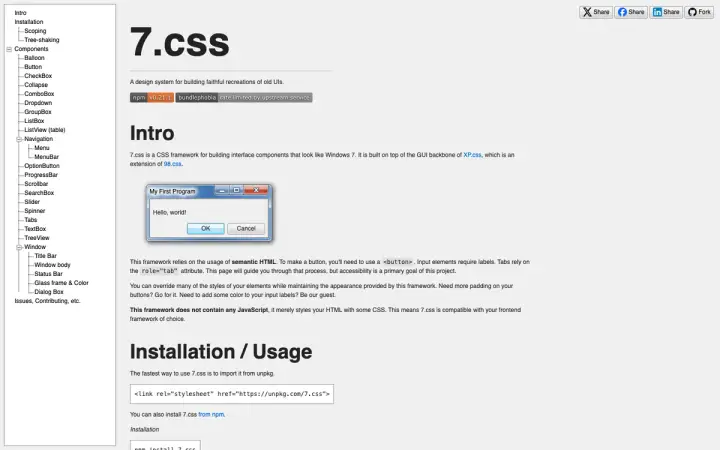
freeWindows 7 Aero look for semantic HTML: glass windows, glossy buttons, menus, balloons and list views, CSS only.

Try these
XP.css
Windows XP Luna look for semantic HTML: blue title bars, glossy buttons, tabs and progress bars; also ships a 98 theme.
98.css
Windows 98 look for semantic HTML: bevelled windows, title bars, buttons, fields, tabs and tree views, CSS only.
system.css
Classic 1-bit Macintosh (System 6) look for HTML: pinstriped windows, Chicago type, dialogs and a menu bar, CSS only.
NES.css
NES-style 8-bit CSS framework: pixel buttons, containers, speech balloons, progress bars, form controls and icons.
Looks that pick it
For your agent
Install
npm i 7.cssUse it for
- a Windows 7 or Vista style window, dialog or desktop for a Frutiger Aero or 2000s nostalgia site
- Aero glass title bars with glossy minimize, maximize and close buttons over a wallpaper
- Win7 controls in one section of an existing app, scoped under a `.win7` wrapper or imported per component
Skip it when
- Windows 95 or 98 grey bevels: use 98-css
- Windows XP Luna: use xp-css
- modern frosted or refractive glass: use glisse; 7.css is period OS chrome, not a material
What's inside25 free
- Balloon
- Button
- CheckBox
- Collapse
- Combobox
- Dropdown
- GroupBox
- ListBox
- ListView
- Menu
- MenuBar
- OptionButton
- ProgressBar
- Scrollbar
- SearchBox
- Slider
- Spinner
- Tabs
- TextBox
- TreeView
- Title Bar
- Window body
- Status Bar
- Dialog Box
- Glass frame
Facts
- Frameworks
- react, vue, svelte, solid, angular, vanilla
- Styling
- css
- Weight
- small
- Accessibility
- ok
- Maturity
- stable
- License
- MIT
- Price
- Free
import "7.css/dist/7.css"

<div class="window glass active" style="width: 300px">
  <div class="title-bar">
    <div class="title-bar-text">Personalization</div>
    <div class="title-bar-controls">
      <button aria-label="Minimize"></button>
      <button aria-label="Close"></button>
    </div>
  </div>
  <div class="window-body has-space">
    <button class="default">OK</button>
  </div>
</div>
https://khang-nd.github.io/7.css/
Loading website